Software that Evolves with Your Business.
Google Maps Business Data Extraction at Scale Google Map Extractor helps you find and collect publicly available business information from Google Maps using targeted keywords, countries, states, cities, areas, and towns. Build multiple search combinations, run searches in bulk, collect business listing data, and export your results for lead generation and business research.
Google Map Extractor helps sales teams, marketers, agencies, and businesses discover publicly available business information from Google Maps and turn local search results into targeted lead lists. Search by business keywords, categories, and locations, then extract available business details and export them for further sales and marketing workflows.
Search and extract publicly available business listing information from Google Maps at scale. Use keywords, business categories, and locations to build targeted business lead lists for local and regional campaigns.
Extract available business information from Google Maps, including business names, phone numbers, addresses, websites, and other available listing details.
Google Map Extractor can identify websites linked to Google Maps business listings and crawl those websites to discover publicly available email addresses and other contact information.
Turn local map data into actionable sales pipelines and transform how you acquire customers — starting today.
Search for businesses using specific keywords and geographic locations. Select countries, states or provinces, cities, and specific areas or towns to create targeted Google Maps searches.
Build and manage multiple keyword-and-location searches in one workflow. Import existing search lists, add multiple keywords, save searches, reset completed searches, and remove selected or unwanted searches.
Collect available business listing information including company names, phone numbers, addresses, websites, email addresses, categories, ratings, reviews, geographic coordinates, and related business data.
Use the websites associated with business listings to discover publicly available email addresses and additional contact information.
Configure minimum and maximum random delays between completed searches to control the pace of large search operations.
Search across international Google Maps domains and work with Unicode characters for business searches and data in different languages and regions.
Automatically save extraction progress and recover your work after unexpected shutdowns or interruptions.
Track viewed business profiles and search history to help avoid extracting the same business data repeatedly and monitor extraction progress.
Find targeted business leads from Google Maps in three simple steps. Build keyword and location searches, collect available business listing data, and export your results for lead generation and business research.
Add business keywords and define your target country, state or province, city, area, or town. You can add multiple keywords and manage multiple search combinations in the keyword list manager.
Start your searches to find relevant business listings on Google Maps. The extractor processes your keyword and location combinations and collects available business information from matching listings.
Collect available business details such as company names, phone numbers, addresses, websites, categories, ratings, reviews, and geographic coordinates. The software can also crawl linked business websites to discover publicly available email addresses. Export your results to Excel, CSV, or TXT.
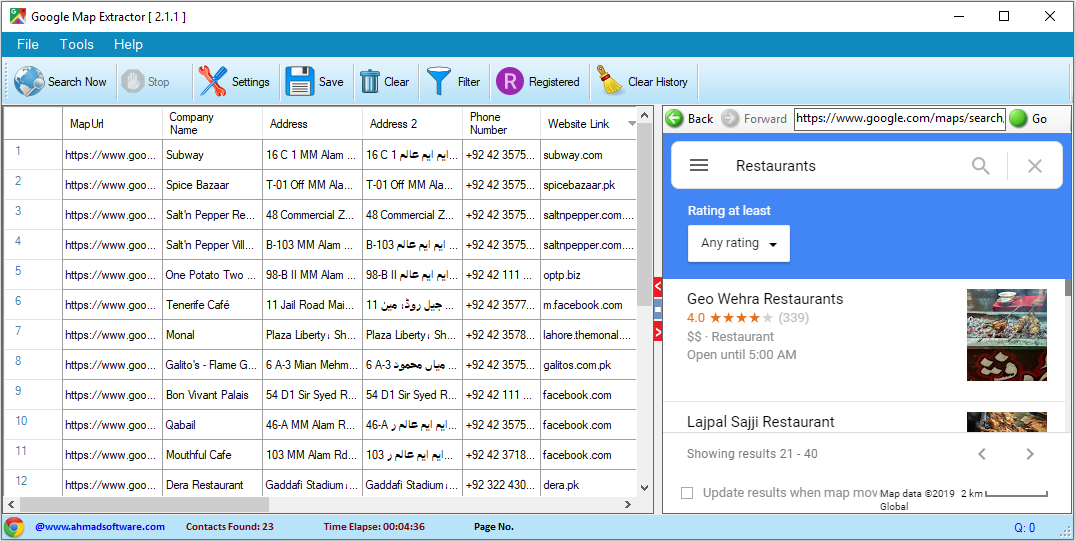
Google Map Extractor provides a desktop interface for searching Google Maps and organizing extracted business data in a structured format. The results can include business names, phone numbers, addresses, websites, email addresses discovered from linked business websites, categories, ratings, reviews, and geographic coordinates.
See what customers say about using Google Map Extractor for business data extraction, lead generation, and sales research.
"We use several products from Ahmad Software Technologies, and we are extremely pleased with them. Simple, easy to use, affordable—and highly recommended."
CEO, AJA Registrars
"This is hands down the most reliable Google Leads Extractor we've used. The structured export makes campaign setup effortless, and the lead quality has significantly improved our outreach results."
Growth Marketing Director
"We replaced three different tools with this Google Map Extractor. The data accuracy and speed are outstanding."
B2B Sales Consultant
Choose the plan that works best for your business needs.
Three-Months subscription
Six-Months subscription
One-year subscription
Google Map Extractor collects publicly available business listing information from Google Maps, including business names, phone numbers, addresses, websites, categories, ratings, reviews, and geographic coordinates when available. The extracted information can be exported to Excel, CSV, or TXT for lead generation, sales, marketing, and business research.
Google Maps standard business listings do not normally provide email addresses directly. Google Map Extractor can identify the website associated with a business listing and crawl that publicly accessible website to discover available email addresses and other contact information.
Yes. Google Map Extractor supports targeted searches using business keywords and geographic locations. You can specify countries, states or provinces, cities, areas, and towns to create targeted Google Maps searches.
Yes. The software includes a keyword and location search manager that lets you build multiple search combinations, add multiple keywords, import search lists, save searches, reset completed searches, and remove selected searches.
Crawl Depth controls how deeply Google Map Extractor scans a business website to discover publicly available contact information.
Level 1 scans the website homepage.
Level 2 scans the homepage and its direct links.
Higher crawl-depth levels allow the software to follow additional subpages within the website.
Yes. When a Google Maps business listing contains a website, Google Map Extractor can crawl the linked website and search its publicly accessible pages for email addresses and other contact information.
Yes. Google Map Extractor provides configurable minimum and maximum random delays between completed searches. This allows users to control the pace of larger search operations.
Yes. The software supports international Google Maps domains and Unicode characters, allowing users to search for businesses using keywords and data in different languages and regions.
Yes. The software automatically saves extraction progress and provides recovery capabilities so that work can be resumed after an unexpected shutdown or interruption.
The software maintains profile and search history to help track previously processed business listings and reduce repeated extraction of the same business data.
Yes. Google Map Extractor supports multiple parallel scraping tasks, with the number of simultaneous tasks depending on the available system resources.
No. The extraction process runs locally on your Windows computer. Ahmad Software Technologies does not store, transmit, or access your extracted business data.
Google Map Extractor can export extracted business data to Excel, CSV, and TXT formats.
Yes. The trial version allows users to test the software's features for a limited period. The trial includes the full functionality of the software except data export.
Install Google Map Extractor and select Activate Full Version. Copy the displayed serial key and contact Ahmad Software Technologies support to obtain a trial license.
Google Map Extractor supports Windows 10, Windows 11, and newer supported Windows versions. The current system requirements also specify .NET Framework 4.6.2 or higher.
Join thousands of digital marketers, sales professionals, and businesses who trust Google Map Extractor to build highly targeted contact lists faster and more accurately than ever before.
Secure checkout • Instant license delivery • No hidden fees
#Google Map Extractor #Google Maps Extractor #Google Maps Scraper #Google Maps Data Extractor #Google Maps Business Data Scraper #Google Maps Lead Generation Tool #Business Data Extractor #Business Listing Scraper #Local Business Lead Generator #B2B Business Data Extraction Software #Google Maps Lead Scraper #Business Contact Data Extractor
I’ve been using the Google Map Extractor for lead generation and it works really well. It quickly pulls accurate business data from Google Maps and email addresses from business website and saves a lot of manual work. The interface is simple, exports are clean, and it’s reliable even for large searches. Definitely a useful tool for anyone doing local marketing or sales.