Software that Evolves with Your Business.
Version#1.5.8
SMSGadget is Bulk SMS text messaging software for business to send marketing & advertising SMS messages to customers with mobile phone or GSM Modem from PC.
| Frequently Asked Questions |
|
| Question: How does SMSGadget Bulk SMS Sender work? |
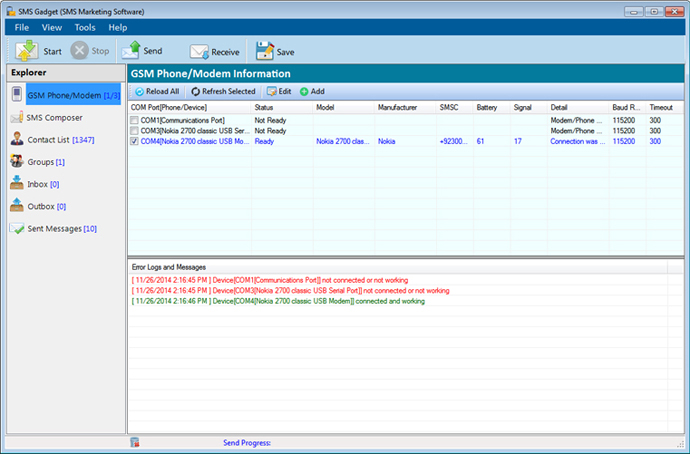
| Answer: SMSGadget Bulk SMS Sender is windows based software. It works by transmitting text messages through a GSM based mobile phone/GSM Modem connected to the computer. |
| Question: What equipment(s) do I need? |
| Answer: Our software supports GSM Modem or any kind of mobile phone supporting GSM Modem. Use your existing mobile phone and connect it to the computer. You are then ready to go!
Most smartphone such as iPhone, Android, Windows Phone and Blackberry DO NOT WORK with our software. They simply do not provide a GSM modem in Windows. Please use an old Nokia, Sony Ericsson or Motorola phone. Also you may use 3G USB dongle such as Huawei. |
| Question: How do I connect my phone to the computer? |
Answer:
You can connect the mobile phone to the computer by:
USB data cable works best because it is fast. Some of them provide power to the mobile phone also (called "Charging connectivity cable"). You need to install the appropriate driver before using it. It usually comes with the cable or can be found at the manufacturer's web site. Bluetooth is also a good choice. It is wireless, convenient and allows you to connect several phones or device at the same time. However, installing the driver and setting up the COM port need some works to do. If you are using Windows XP service pack 2 (SP2), it natively support Bluetooth dongle from CSR (Cambridge Silicon Radio). Another issue with using Bluetooth is the confirmation at the mobile phone side whenever you try to connect it from PC. If this cannot be suppressed, it would be very inconvenient. Luckily, Nokia, Sony Ericsson and Motorola phones provide such features. Using Infra-Red is feasible but not recommended. because the wireless range is very short, directional and unstable. |
| Question: Where can I find the drivers for the USB data cable of my mobile phone? |
| Answer:
You can download USB data cable driver from your mobile vendor site. You can also download here: Nokia USB data cable driver Sony Ericson USB data cable driver Motorola USB data cable driver Huawei USB data cable driver |
| Question: Which brand of mobile phones does SMSGadget Bulk SMS Sender support? |
| Answer:
The GSM edition supports all major brands like Nokia, Sony Ericsson and Motorola. In addition, it can send SMS using both PDU mode and Text mode. |
| Answer:
When you order a license and enter the unlock key into the software, all those AD texts will be gone. |
| Question: Can I change or hide my phone number from the recipient? |
| Answer:
Your phone number will be shown to the recipient and it cannot be changed or hidden. |
Bulk SMS Sender - SMSGadget, SMS Software - SMSGadget, SMS Marketing Software - SMSGadget, Bulk SMS Software - SMSGadget, SMS Messaging Software - SMSGadget, SMS Solution - SMSGadget, SMS Manager - SMSGadget, SMS Sender - SMSGadget, Mobile Marketing Software - SMSGadget, SMS Broadcaster - SMSGadget, Instant SMS Software - SMSGadget, Bulk smssender - SMSGadget
I foud SMS Gadget very useful and cheap equally. Without annoying any receipient of duplicates. Have the facility of sending sms from multiple devices at the same ime.